A Professional PowerPoint Template for Business Management
Creating a presentation that effectively communicates complex business strategies can be a daunting task. Between gathering data, formulating ideas, and designing slides, the process often consumes valuable time that could be spent on execution. The Business Management PowerPoint Template is designed specifically to solve this problem. It is a comprehensive set of pre-designed slides that provides a structured, visually compelling framework for presenting management plans, growth initiatives, and marketing strategies.
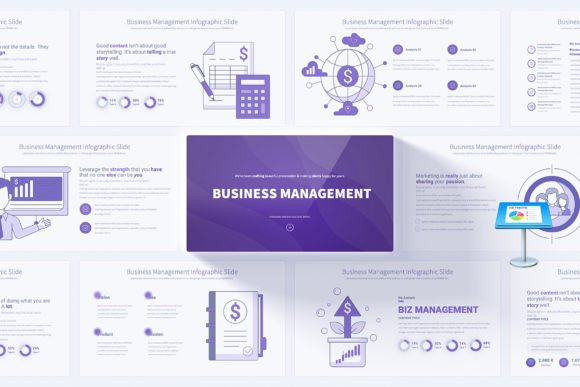
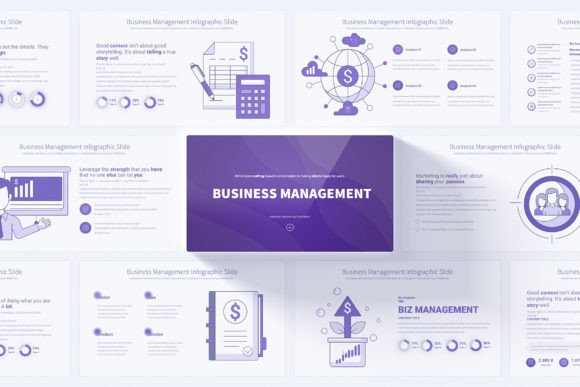
In practical terms, this template is a file you open in Microsoft PowerPoint. Inside, you find a library of 17 distinct slide designs, each crafted for a specific business communication purpose. These unique slides are replicated across 12 different color schemes, giving you a total of 204 slides to choose from. Every element—text boxes, charts, icons, and infographics—is fully editable. You simply replace the placeholder content with your own data and message. The core value is immediate professionalism and significant time savings. Instead of building slides from a blank canvas, you start from a polished, high-quality foundation.
Key Features and Practical Benefits
The appeal of this template lies in its blend of aesthetic quality and functional design. It is created in the standard 16:9 Full HD resolution, ensuring your presentation looks crisp on modern monitors and projectors. The light background variations maintain readability and a clean, corporate feel. Perhaps most importantly, the entire template utilizes PowerPoint's Slide Master feature. This means changing the font, color palette, or logo placement across all 204 slides can be done in just a few clicks, guaranteeing consistency and enabling efficient customization.
Beyond the structure, the template includes resources to elevate your content. Handmade infographics transform dry statistics into engaging visual stories. A bonus set of 280 fully editable vector icons allows you to illustrate concepts without searching for external graphics. Each slide also comes with animated transitions, adding a dynamic flow to your presentation without requiring advanced PowerPoint skills. For those new to templates, included PDF documentation guides you through the editing process, making the system truly user-friendly.
Who Needs This Template and Why?
The target audience for this resource is broad, reflecting the universal need for clear business communication. A startup entrepreneur pitching to investors needs to convey a credible growth strategy. A marketing manager presenting a quarterly plan to the leadership team requires clarity and impact. A freelance consultant advising a client on organizational changes must present recommendations persuasively. For all these professionals, the primary problem is the same: they need to create a high-stakes presentation quickly, and their design skills or time may be limited.
This template supports the goal of winning trust, securing approval, or motivating a team. It helps the user focus on their content and message, while the template handles the design and structure. Educators teaching business courses can use it to create clear lecture materials. Bloggers and content creators might adapt slides for video content or webinars. Even hobbyists involved in club or community group management can find the structured slides useful for planning and reporting.
Real-World Use Cases and Applications
Imagine you are a small business owner preparing for an annual review. You need slides covering financial performance, team structure, market challenges, and future goals. With the Business Management PowerPoint Template, you would quickly find dedicated slides for:
- Executive summaries and opening agendas.
- Timeline infographics for project milestones.
- Comparative charts for market analysis.
- Process flow diagrams for operational strategies.
- Professional closing slides with call-to-action summaries.
You select the slides that match your narrative, input your specific numbers and text, and perhaps choose a blue color scheme to align with your brand. Within hours, you have a cohesive, professional deck ready for your audience. Another example: a corporate trainer developing a module on leadership principles. They can use the template’s icon-rich slides and editable mind maps to visually explain concepts, creating a more engaging learning experience than text-heavy documents.
Important Considerations Before Using a Template
While a template offers immense advantages, it is crucial to approach it as a tool, not a replacement for your expertise. The content you insert must be robust and relevant; a beautiful slide with weak data will not convince anyone. Before choosing any template, consider your actual need. Do you require deep data visualization, or more high-level strategic frameworks? This particular template, with its business management focus and extensive infographics, leans toward the latter.
Also, ensure you are comfortable with basic PowerPoint functions like editing text, moving objects, and using the Slide Master view. The template is designed for easy editing, but a fundamental understanding of the software is necessary. Finally, remember that customization is key to authenticity. While the provided color variations are professional, you might need to adjust them to match your company's exact brand colors. The fully editable nature of the elements makes this possible, but it requires a deliberate effort to maintain a unique identity and not just deliver a "generic" template look.
Making the Template Work for You
The ultimate goal is to make your business strategies understood and remembered. This template provides the vessel. Start by browsing the 17 unique slides to understand the available layouts. Map your presentation's storyline to these layouts. Use the handmade infographics for key data points where visual impact is critical. Leverage the vector icons to add intuitive symbolism to complex ideas—like using a bridge icon to represent partnership building or a tree icon to depict growth.
Do not feel compelled to use every animation; apply transitions sparingly to maintain a professional tone. The 12 color variations allow you to adapt the presentation's mood—perhaps using a warmer palette for internal team meetings and a cooler, more formal one for client presentations. By combining the template's structural strength with your specific content and strategic intent, you create a presentation that carries both clarity and authority, effectively communicating your management vision and driving your business objectives forward.