Evaluating the Future Technology Keynote Infographic Slides Template
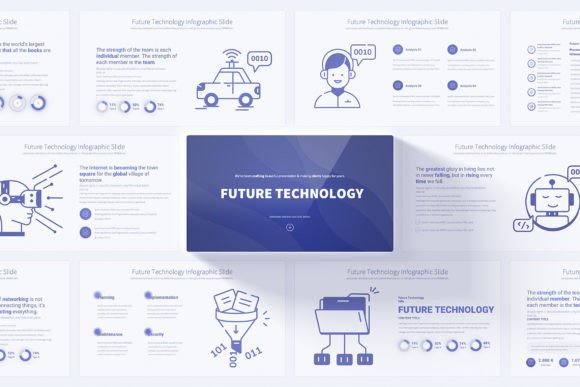
When preparing a presentation on technological innovation, the visual and structural framework you choose becomes a critical part of your communication. The Future Technology Keynote Infographic represents a specific resource designed for this purpose: a comprehensive Keynote template intended to convey complex, forward-looking topics with clarity and a modern aesthetic. Its value lies not in being a singular piece of content, but in providing a systematic, editable foundation for building professional presentations.
Core Characteristics and Structural Design
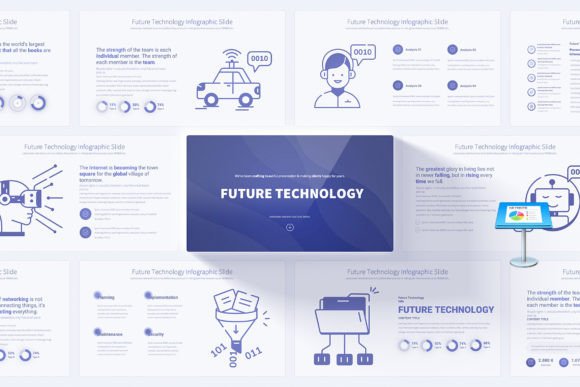
The template is built around a set of 17 unique slide designs. These serve as master concepts, each expanded into multiple variations. The total offering of 204 slides is achieved through these variations and the included 12 distinct color schemes. This structure means you are not receiving 204 disparate ideas, but a coherent system. All slides are based on Master Slides, a fundamental feature for efficient customization. Changing a font, color palette, or logo placement on a master slide propagates throughout the entire presentation, ensuring visual consistency and saving significant time during edits.
The design is purposefully set on a clean, light background, prioritizing readability and a focused canvas for the infographics. The 16:9 Full HD resolution is the contemporary standard for digital presentations and video conferencing, ensuring your work appears sharp on modern displays. Animated elements and transitions are included, but their utility depends on judicious use; they can emphasize a point or sequence, but the template’s strength does not rely solely on animation.
Practical Utility and Content Support
Beyond the slide count, the package includes several practical assets. The bonus collection of 280 fully editable vector icons is a notable addition. These icons can be resized, recolored, and reused without loss of quality, providing a versatile library for illustrating concepts like AI, robotics, connectivity, and data flow. The handmade infographics are pre-designed visualizations—charts, process flows, timelines, ecosystem maps—tailored to technology themes. Their pre-built nature simplifies the task of explaining intricate systems, allowing the presenter to focus on content rather than graphic design.
PDF documentation is typically included in such templates, offering guidance on editing techniques within Keynote. This supports users who may be less familiar with the software’s advanced features, enhancing the overall user-friendly claim.
Performance in Real-World Application
In practical use, the Future Technology Keynote Infographic performs as a productivity tool. Its primary function is to reduce the time and effort required to achieve a polished, thematic visual standard. For a professional tasked with creating a quarterly R&D update, a product launch for a tech startup, or an academic lecture on emerging trends, starting from a blank slate can be a major overhead. This template provides a legitimate starting point.
The quality of the final presentation hinges on the user’s content. The template offers a consistent and professional shell, but it cannot substitute for substantive research and clear narrative. The effectiveness of the animated elements will depend on the presenter’s style; some audiences appreciate subtle motion to guide attention, while others prefer a more static, focused view. The flexibility is high due to the editable nature of all elements and the master slide system, allowing organizations to align the presentation with their brand colors and typography.
Assessing Long-Term Value and Reliability
The long-term value of such a template is tied to its reusability. Given the 12 color variations and the multitude of slide layouts, it can serve as a foundational resource for multiple presentations over time without appearing repetitive to the same audience. The reliability is consistent, as it is a digital asset file; its performance is standard within the Keynote application environment. There is no ongoing service or subscription, which can be an advantage over some cloud-based presentation platforms.
Who Benefits Most from This Resource?
The Future Technology Keynote Infographic is particularly suited to specific roles and scenarios. It is a fitting choice for:
- Corporate Technology Strategists and R&D Teams: Individuals who regularly communicate roadmaps, innovation pipelines, or technical white papers to internal or external stakeholders.
- Educators and Trainers in STEM Fields: Lecturers who need to structure complex information for students in a visually engaging manner for courses or workshops.
- Entrepreneurs and Startup Founders: When pitching to investors or explaining a novel technology product, a polished presentation can enhance credibility.
- Marketing Professionals in Tech Industries: Creating campaign overviews, product feature deep-dives, or industry trend reports for sales teams or clients.
- Freelancers and Consultants: Those offering services in tech analysis, digital transformation, or innovation advisory can use it to standardize their client deliverables.
For bloggers or hobbyists, its utility is more limited unless their work involves producing high-stakes, formal presentations. The template is less suitable for audiences expecting a highly informal, conversational, or minimalist visual style.
Potential Limitations and Considerations
While the Future Technology Keynote Infographic offers clear advantages, realistic evaluation requires noting its constraints. First, it is designed specifically for Apple’s Keynote software. Users locked into PowerPoint or Google Slides ecosystems cannot utilize it without conversion efforts, which may compromise some design integrity. Second, the “future technology” aesthetic, while clean and professional, carries a specific visual tone—often using gradients, abstract data visualizations, and a certain color palette. If your brand or topic requires a drastically different look (e.g., highly conservative, playful, or dark-themed), extensive editing will be necessary.
Finally, the abundance of slides—204—can be a double-edged sword. It offers choice, but may also lead to decision paralysis or the temptation to over-design a presentation by using too many varied layouts. Disciplined selection of slides that best serve the narrative is recommended.
Final Observations on Fit and Implementation
Determining if the Future Technology Keynote Infographic fits your needs depends on your workflow, tools, and audience expectations. If you use Keynote regularly and present on topics like artificial intelligence, blockchain, quantum computing, sustainable tech, or digital futures, this template aligns well with the subject matter. Its practical recommendation is as a baseline template to be customized with your specific data, insights, and narrative.
For optimal results, treat it as a structured toolkit. Begin by selecting one of the 12 color variations that best matches your context. Use the master slides to set your corporate fonts and logo. Then, browse the unique slides and handmade infographics to select layouts that logically correspond to your presentation’s flow: an opening slide for the big picture, timeline slides for development phases, comparison charts for technology options, and ecosystem maps for interconnected systems. Fill the editable text boxes and replace placeholder icons with relevant ones from the included library. The goal is to leverage its professional framework to accelerate production while ensuring your original content remains the focal point.
In essence, this template provides a sophisticated visual vocabulary for discussing technological advancement. Its worth is measured in the time it saves and the consistent professional standard it helps maintain, allowing the presenter to dedicate more energy to the substance of their message.