The Essential Role of Link Icons in Modern Digital Design
In the digital landscape, clarity and communication are paramount. Every button, navigation element, and call-to-action relies on a silent language: icons. A well-chosen icon can guide a user, convey function instantly, and elevate the aesthetic coherence of a project. However, sourcing a consistent, high-quality set of icons that fits the specific needs of diverse projects—from a sleek mobile app to a corporate banner—often becomes a significant hurdle for designers and developers. This is where a comprehensive resource like Link Icons transforms the creative process.
The Universal Challenge: Finding Cohesive, Adaptable Visual Assets
Designers frequently face a fragmented workflow when it comes to icons. Perhaps a free set lacks the necessary style variation, or a premium pack doesn't include the required file formats for both web and print. The common struggles include piecing together icons from disparate sources, resulting in inconsistent line weights and visual styles, wrestling with file formats incompatible with your preferred software, and spending hours manually resizing or recoloring icons instead of focusing on the core design. The goal is simple: a single, dependable library that is visually harmonious, technically flexible, and immediately usable across any medium.
How Link Icons Addresses Core Design Needs
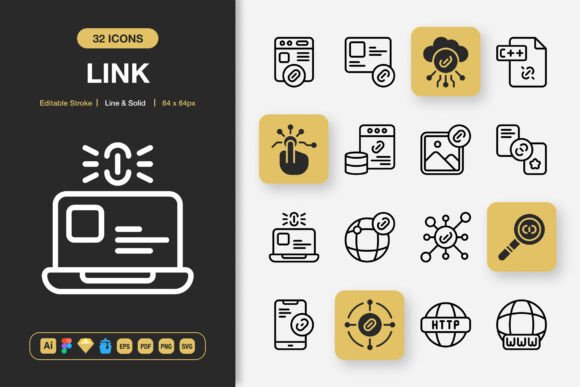
Link Icons is conceived as a solution to this fragmentation. It is not merely a collection of images; it is a unified system of high-quality icons designed for maximum adaptability. The foundation of its utility lies in its dual-style offering. With both Line and Solid versions, you maintain brand consistency while having the versatility to create visual hierarchy—using solid icons for primary actions and line icons for secondary elements, for instance. The editable stroke feature is particularly powerful, allowing you to adjust the weight of line icons to perfectly match your typography and design grid, ensuring everything feels part of a single family.
The true measure of any asset pack is in its practical application. Link Icons is built for implementation. The inclusion of source files like Adobe Illustrator and Figma means you can customize colors, combine elements, or tweak shapes directly within your design environment without losing quality. For developers and rapid prototypers, the easy drag-and-drop nature of files like Iconjar and the provided Sketch file streamline integration. Whether you are designing an interface or laying out a printed flyer, having direct access to the source vector files removes technical barriers.
Practical Applications Across Projects and Media
The versatility of Link Icons shines when you consider its potential applications. For a website or mobile app, the SVG and PNG files at multiple resolutions (from 32px to 512px) ensure crisp rendering on any screen, from the smallest smartphone icon to a large desktop display. The same set can be employed in social media graphics, creating a recognizable visual identity for posts and campaigns. Beyond the screen, the EPS Version 10 and PDF files make Link Icons perfectly suitable for print media—infographics, flyers, banners, and posters—where vector quality guarantees sharp output at any size.
Even authors and content creators can leverage these icons in books or eBooks to illustrate concepts cleanly. The outcome is a unified visual language that travels with your brand or project across every touchpoint. This consistency builds professional credibility and enhances user experience by providing familiar, intuitive symbols.
Recommendations for Different Users and Approaches
How you utilize Link Icons will depend on your role and project scope. A startup founder building a new app might focus on the Figma and PNG files for quick UI/UX prototyping and developer handoff. A marketing professional designing a campaign might rely heavily on the Illustrator files and EPS versions to produce coordinated digital ads and physical print materials. A freelance graphic designer would appreciate the comprehensive format library as it allows them to accept a wider variety of client projects without worrying about asset compatibility.
When integrating Link Icons, start by auditing your project's needs. Identify the key actions and concepts you need to visualize. Then, utilize the style variation (Line vs. Solid) to establish a clear visual hierarchy within your design. The provided readme.txt file is your first point of reference for navigating the package effectively. Remember, the power of a minimalist icon design lies in its simplicity and clarity; avoid overusing them. Let each icon serve a distinct, communicative purpose.
Key Considerations for Implementation
While Link Icons provides the technical flexibility, successful implementation requires thoughtful design decisions. Always consider the context in which the icon will be seen. A 128px icon might be perfect for a poster headline but overwhelming in a mobile app navigation bar. Use the scalable vector formats (SVG, EPS, Illustrator) to your advantage, ensuring perfect sizing every time. Furthermore, customization is encouraged—the editable strokes and source files mean you can adapt the set to your exact color palette or even create new composite icons, but strive to maintain the minimalist essence that makes the pack cohesive.
Ultimately, resources like Link Icons are about empowering creators. They reduce the time spent on asset procurement and technical troubleshooting, freeing you to focus on the bigger picture: crafting compelling user experiences, building strong brands, and communicating ideas with elegance and efficiency. By providing a single source of truth for iconography across all project types, Link Icons helps change not just your next project, but your entire workflow, turning a common challenge into a streamlined advantage.